I recently bought a 2019 Mac Pro. I know that doesn’t sound like a smart move in 2026, especially with Apple Silicon now dominant and Intel Mac support winding down, and for a couple of weeks I told myself the same thing.
Apple discontinued the entire Mac Pro line in March, both the Intel model I bought and the M2 Ultra tower that replaced it in 2023. There will not be another one.
So instead of another spec sheet comparison, here’s the real story: why I bought a 2019 Mac Pro despite knowing better, what actually happened when I tested it against my M1 Max in Blender and Lightroom, and where I’ve landed now that I’ve lived with it for a while. That last part isn’t as tidy as I expected it to be when I started writing this.
The deal that started this
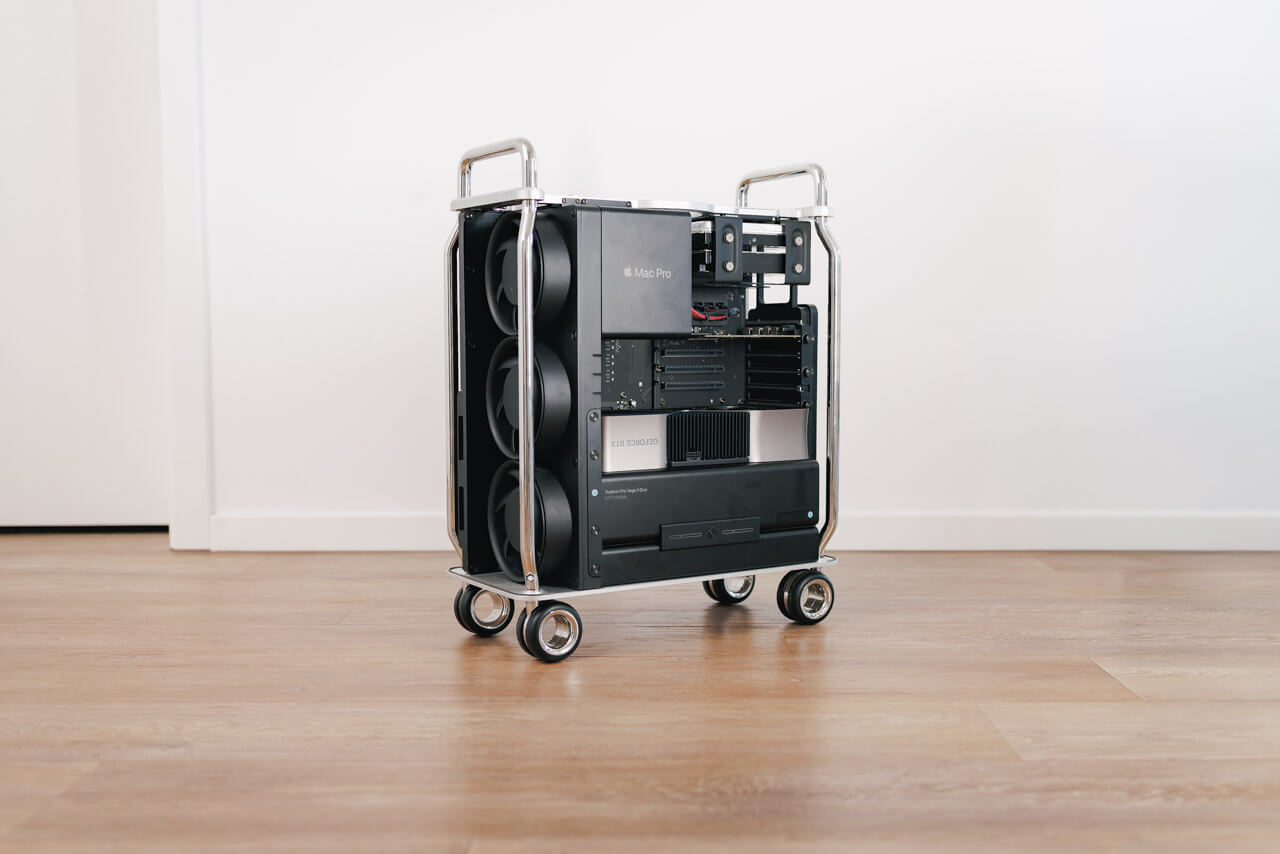
The offer was a 2019 Mac Pro on wheels, with the 24-core Xeon, 192GB of RAM, the original 8TB SSD, and a Sonnet drive carrier holding a 10TB and an 18TB hard drive. The graphics card installed was a Radeon Pro Vega II Duo with 64gb VRAM, one of the strongest GPU options Apple ever put in this machine. It even came with a spare RX580 MPX Module, which was really nice.
Base 8-core configs in Germany still go for around €1,000 to €1,200, with a 256GB SSD, 64GB of RAM, and just the 580. The higher-spec deal was definitely the better value, and it gave me the option to reduce what I actually spent by downgrading it myself.
This also wasn’t my first Mac Pro. I had a 5,1 model back in 2018, and I’d wanted one of the 7.1 models since they launched in 2019, mostly for the design and the idea of a machine you can actually open up and configure. I never could justify the cost while my M1 MacBook was outperforming it in almost everything that mattered to me day to day. That hadn’t really changed by the time I bought this one either.
Why I bought it anyway
I was fairly sure it wouldn’t outperform my M1 Max, and that even where it did, it wouldn’t move the needle much. I’m not doing professional video or photo work daily, so a faster workflow wasn’t really something I would benefit from. It’s also noticeably more power hungry and less efficient than Apple Silicon.
And mostly, that assumption held up. In most of what I tried, the Mac Pro lost to my MacBook. But in a few specific situations it was still way faster, almost entirely when raw graphics power was the bottleneck.
My initial plan was to downgrade it and keep it running as a design piece and a storage and backup solution, a NAS and Time Machine target in one. That way it would need to run around the clock, which drives the power bill up, but I could justify it to myself: it’s genuinely practical to have all that storage inside one case instead of dangling drives off the back of a Mac Mini.
Who this machine is actually for
My creative workload is Lightroom, DaVinci Resolve, some Blender, and occasionally Fusion 360 for 3D work. That’s the heaviest thing I throw at any computer. I work with 8K RAW footage from RED and Canon cameras, plus 45-megapixel stills from my R5.
There’s also a newer piece to this. My latest project, luuq.studio, needs 3D modeling, technical drawings, and realistic scene rendering, all of which lean heavily on graphics and compute performance, which is still something of a weak point for Apple’s M-series chips. That’s specifically where I hoped the Vega II Duo would carry its weight.
If you’re regularly rendering, exporting large RAW batches, or working in software that actually uses a GPU, the calculation is worth making.
The Blender problem I didn’t know
It didn’t work out the way I expected, because Blender dropped Metal GPU rendering for AMD cards after version 4.2, and cut off Intel Mac support entirely at 4.5 LTS. If you want GPU rendering on an Intel Mac at all, you’re stuck on an old branch missing years of features.
That closed the door on native macOS GPU rendering for what I needed. It also opened a different one: Boot Camp and Windows meant I could run Nvidia cards, which are simply better supported for Cycles rendering in Blender than anything AMD currently offers. So I added an RTX 4080, and I finally had a real reason to keep the Mac Pro.
The benchmarks
Despite the support issues I installed the older blender version on my M1 and the Mac Pro with the Vega II, to see the difference in their performance by running an image render on Blender’s own splash-screen render for Blender 4.1, and made sure to only count the second run, after the shader compile, so the numbers aren’t skewed by the first-load penalty.
- M1 Max MacBook, legacy 4.2 branch, experimental Metal: 14 minutes 38 seconds per frame
- M1 Max MacBook, newest Blender build for Apple Silicon: 13 minutes 12 seconds per frame
- Mac Pro / Vega II Duo, experimental Cycles: 4 minutes 10 seconds per frame
- Mac Pro / Vega II Duo, standard supported mode: 4 minutes 19 seconds per frame
That’s more than three times faster, on either mode. Blender itself only used about 23GB of RAM during that Mac Pro render, though total system memory climbed to 117GB.
Lightroom went the other way. I exported 46 Canon R5 II CRAW files from a recent trip at 45 megapixels, straight to the desktop.
- M1 Max, full 46-photo export: 1 minute 45 seconds
- M1 Max, AI denoise only: 36.12 seconds
- Mac Pro, full 46-photo export: 1 minute 58 seconds
- Mac Pro, AI denoise only: 17.87 seconds
The M1 Max wins the real export. The Mac Pro wins the isolated denoise step by almost half. There’s no single winner here, just two different jobs pulling in different directions.
A fun addition to the benchmark
After I learned about Blender dropping AMD GPU support, I started looking at Nvidia cards instead. I found a good deal on an RTX 3080 and an RTX 4080 and picked up both, mainly to see how they’d stack up against my M1 Max MacBook and a base M4 Mac mini with 24GB of unified memory.
This time I used a different demo file, so it’s not directly comparable to the Vega II numbers above, but it still gives a good sense of how these actually stack up against each other. I ran the Monster Under The Bed demo file on the latest Blender version, with the latest drivers for each system. Here’s what I got:
- M1 Max MacBook: 2 minutes 20 seconds, GPU power up to 25W (Stats app)
- M4 Mac Mini: 1 minute 32 seconds, GPU power up to 18W (Stats app)
- RTX 3080: 58 seconds, GPU power up to 260W (Nvidia app)
- RTX 4080: 32 seconds, GPU power up to 230W (Nvidia app)
The M4 Mac mini beat my M1 Max MacBook by almost a minute, about 34% faster, while using roughly a third of the GPU power.
The Nvidia cards are still faster outright. The RTX 4080 rendered the scene in 32 seconds, about 77% faster than the M1 Max MacBook and about 65% faster than the M4 Mac mini. The RTX 3080 came in at 58 seconds, about 59% faster than the M1 Max MacBook. The power draw tells a different story, though: 230 watts for the RTX 4080 against 18 watts for the M4 Mac mini. You get the speed, but you pay for it in power, on top of needing Windows and Boot Camp to access it at all.
The M5 Max has been out since March, when Apple finally brought M5 Pro and M5 Max chips to the MacBook Pro line, months after the base M5 shipped in October. The numbers are worth a look. On the official Blender benchmark, it scores ahead of where the RTX 4080 Laptop landed. On synthetic GPU tests, it’s within a few percent of the RTX 4080, sometimes ahead. There’s a catch: independent reviews found thermal throttling on the compact 14-inch MacBook Pro specifically, and the 16-inch model runs about 15% faster on the exact same chip, just from having more room to cool it. A Mac Studio would have even more headroom than either laptop. Nvidia’s lead for serious Blender work is closing fast. Begging the question: Should I just go for a M5 Max MacBook, when I really don’t need the last few percent in performance?
What it actually costs to run
But lets get back to the Mac Pro. None of the performance is free. My Mac Pro idles around 200 watts and climbs to 350 to 400 watts under load with the Vega II, mostly from the GPU. The M1 Max uses a fraction of that even at full tilt.
Fan noise is noticeable during longer renders, though I actually don’t mind it. My M1 Max spins up too under sustained load, and its fan is higher pitched, which I find more noticeable and a bit more annoying. The heat coming off the Mac Pro, though, is genuinely hard to ignore in a room in summer.
Then there’s the tempting idea, since I’ve got 24 cores and 192GB of RAM sitting there: could I run local LLMs on this thing? Technically, yes. Realistically, running it around the clock at high load would cost me roughly €600 a year in power alone here in Germany. That’s real money for something a cloud subscription handles for less, unless you have a specific reason to keep it running locally all the time.
What to do with a 2019 Mac Pro in 2026
And now the answer to the final question: What should I do with it?
I originally planned to downgrade mine and keep it running as a NAS and Time Machine target, the drives sitting inside a proper case instead of dangling off the back of a Mac Mini. Then the Blender numbers gave me a second reason: real, GPU-bound rendering power, once I added the RTX 4080. Both of those reasons look a bit shakier now than when I started this. A cheap NAS enclosure would do the storage job for a fraction of the power draw, and benchmarks suggest the M5 Max gets close to RTX 4080-level Blender performance without Windows or a second GPU at all. Since I really like macOS and want to keep using it, this is a big advantage for me in which i wouldnt mind leaving a few percent of peformance on the table.
So I don’t have a tidy ending for you. I still like the way it looks under my desk. Whether it’s still there in six months depends on whether either of those reasons actually holds up, and right now I couldn’t tell you which way that goes.
If you’re buying one, my advice would be:
- An 8 to 16-core Xeon, with 12 to 16 cores as the sweet spot
- 96 to 128GB of RAM, plenty for most kind of work
- A cheap Radeon Pro 580 MPX module for displays over the four Thunderbolt ports
- A stronger card for actual compute: a 6800 or 6900 if you’re staying in macOS, an Nvidia card if you’re planning to lean on Boot Camp
Budget €800 to €2,000 depending on that configuration, plus the added graphics card. With that you get a really nice looking computer that can handle tough workflows and gaming.
The bottom line
Apple isn’t making another one of these, so buying one now means buying a fixed, finite tool rather than a stepping stone to the next Mac Pro. Mine has already earned its keep in what it’s taught me about my own workflow. What happens to it next is still an open question, and that’s a more honest place to leave this than a clean verdict.